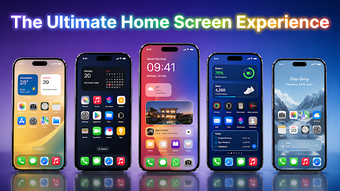
iOS-style Android launcher that reshapes home screen and app access
Experience an iOS-inspired interface on Android with Launcher OS Proo Max, developed by AVEDIA, designed to remap your home screen and app organization for a different look and workflow. The app replaces the default launcher to present an organized app library, gesture-based search, and high-definition theme transitions for visual consistency. It targets Android users who prefer a structured, phone aesthetic and a familiar alternative to the stock launcher experience.
What the launcher actually replaces and how it presents apps
The launcher acts as a personalization utility that reworks your device's home screen into an iOS-style layout. It supplies a Smart App Library that automatically categorizes installed applications and exposes a swipe-down search for quick access. The tool also supports high-definition wallpapers and theme transitions, offering a consistent visual presentation across pages rather than a single static skin.
Does it slow down your device during use?
The developer describes the launcher as lightweight and optimized for a range of hardware configurations, so it is designed to run smoothly on modern devices. Support extends to Android 5.0 and up, which broadens device compatibility. In practice the launcher focuses on visual responsiveness and reduced overhead, making it appropriate for phones where conserving system resources matters.
Is it safe to use on a personal device?
Safety features include an integrated Control Center and Assistive Touch that interact with system toggles like Wi-Fi, Bluetooth, and brightness. Those controls interface with device settings, so users should expect the launcher to request relevant permissions to toggle system functions. The built-in privacy option to hide icons removes selected shortcuts from the main view, giving a simple privacy layer without modifying underlying app installations.
Do I need technical knowledge to customize the launcher?
Customization mixes automatic and manual tools to suit different users. The launcher accepts custom icon packs, allows renaming and hiding of icons, and offers configurable interface transitions for those who want hands-on theme work. Casual users gain immediate organization from automatic categorization, while more experienced users can fine-tune icon names and apply third-party icon sets for a specific visual result.
Useful for appearance-focused users, with a single clear trade-off
The launcher is a practical choice for Android users who want a visual remap that approximates another platform while keeping device responsiveness intact, according to its stated optimization. The main trade-off is that it imitates another operating system’s experience rather than replacing native system behavior, so those seeking genuine, system-level parity should expect some functional differences.